SybaNet master PC 5.0 with touch panel and Lab Manager software, 42PU
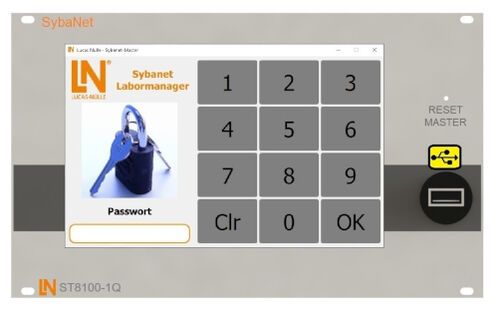
SybaNet control unit / touch panel PC 5.0 for controlling and monitoring classrooms and laboratories. All functions are controlled, regulated and monitored by means of the accompanying software (Lab Manager) via the (master) touch panel.
All switch states of the student workstations are graphically displayed (user menu). Configuration and log-in from the individual workstations are also implemented via the touch panel (admin menu).
In addition, different configurations can be set up for various users using the software.
Via a USB port on the operating panel, users themselves can apply the auto-detection feature of the system to install any updates.
Software characteristics:
- Software for managing the complete (networked) lab with up to 20 workstations (controllable clients, the number of which is adjustable).
- LINUX-based software, conserves resources, maintenance-free, stable performance (does not slow down during extended operating periods).
- Organisation into admin and user menus
- Password-protected access to both menu areas
- Graphic set-up and overview of the lab (room configuration)
- Automatic IP address assignment with full exclusion of IP conflicts
- Workstations can be controlled individually, in groups or all together
- Workstations can be enabled individually, in groups or all together (safety extra-low, AC, and three-phase voltage)
- Equipment can be individually enabled or disabled at the various student workstations
- Ability to switch voltages on for limited periods of time using a timer function
- Additional remote control of various lab power supplies and signal equipment
- The graphic user interface allows specific equipment to be selected and parameters to be configured
- It is possible to pre-set, disable or limit, and monitor various voltages and signals for different devices
- Plug-in modules can be controlled directly. This enables a student or a group of students to pre-set a specific signal on the signal generator, the DC outputs, or the three-phase generator. Students have the option to disable equipment to adjust a setting.
- Graphic display of all functions for the various workstations, such as switch states etc.
- EMERGENCY OFF display including station recognition
- RCD (FI) / and circuit breaker trigger detection, graphically displayed with station recognition
- Display of an overload, e.g. following a short circuit
- Temperature monitoring and overheating protection (including graphic display)
- Control of automatic table/power duct lowering system
- Software automatically detects connected devices and addresses them without address conflicts (plug-and-play)
- Timed enabling via countdown timers which can be deactivated (e.g. for measurement exercises or examinations)
Technical Data Hardware:
- Capacitive touch panel as 7" TFT LCD display
- 1024x600px resolution
- High-level brightness 800cd/m²
- Colour depth 16.7 M
- Wide viewing angle (IPS)
- Multifunctional OSD menu to adjust brightness, contrast and saturation
- All STM32H7 interfaces
- Industrial projected capacitive touchscreen
- Black decorative cover glass made to industry standards
- High quality – no "bad" pixels
- Pixel orientation: vertical RGB strips
- Metal frame
- Direct support of TouchGFX
- 1.8 GHz ARM Cortex-A72 quad-core CPU
- 2 GB LPDDR4 SDRAM
- Gigabit LAN RJ45 (up to 1000 Mbit)
- Bluetooth 5.0
- 2.4 GHz and 5 GHz IEEE 802.11 b/g/n/ac wireless LAN
- 2x USB 2.0 / 2x USB 3.0
- Power supply via wide input range 90–264 V AC