IMS Virtual Trainer package
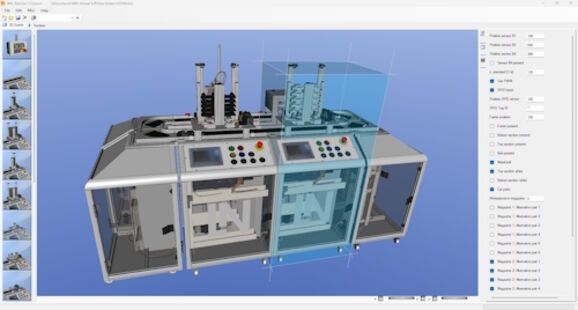
IMS® Virtual is a PC-based, graphical 3D simulation system that provides the virtual learning environment for the mechatronic training systems IMS® and IMU. The virtual stations and production systems are displayed as dynamically animated, virtual 3D scenes in real time with all components. This 3D scene is programmed with STEP 7 like the real models and controlled via the "PLCSIM" software. In the teacher/instructor version, almost any configuration of IMS® production systems can be created from a library of virtual IMS® models with just a few mouse clicks.
Not only the transport systems (IMS) are available, but also the Mechatronic Units (IMU).
The trainer package consists of one teacher and 12 student versions, which are licensed via a USB dongle on the network.
Features:
Design and behavior of processes are modeled in detail and clearly in 3D
Faults are realistically simulated in the process simulations
Library with functional mechatronic stations and systems
Real-time simulation
Collision detection
Error simulation: Configuration of errors in sensor adjustment and in the electrical or physical properties of components
Parameterization, programming and commissioning of technologically different systems
Performing systematic troubleshooting on production systems
Central operation and monitoring of systems and processes
Learning the functionality and system structure of a production system
Technologies:
Speed control via PWM
Positioning via incremental encoder
Level measurement in magazine via ultrasonic sensors
Data transfer and identification via RFID read/write heads
Status display via integrated LED strips
Control of virtual models via PLCSIM or real hardware PLC
The following stations are available in the library and can be combined with the teacher version to create almost any systems:
IMS® 1 Transport systems, consisting of the following conveyor belt segments: passive, driven and 180° curve
IMS® 3 Separating
IMS® 3d Double station Separating
IMS® 4 Assembly
IMS® 4d Double station Assembly
IMS® 5 Processing
IMS® 5d Double station Processing
IMS® 6 Testing
IMS® 7 Handling
IMS® 8 Storage
IMS® 11 Disassembly with a robot
IMS® 16 Painting
Furthermore, a wide variety of combinations for systems are prepared and already available in the library:
CBP 43 Block production with 3 stations (line configuration)
CBP 44 Block production as rotary system (with ejection)
CCP 43 Car production with 3 stations (incl. painting of cars)
CCP 44 Car production as rotary system (with ejection)
Each combination is also prepared as an IMU variant:
UBP 43 Block production with 3 stations (line configuration)
UBP 44 Block production as rotary system (with ejection)
UCP 43 Car production with 3 stations (incl. painting of cars)
UCP 44 Car production as rotary system (with ejection)
System Requirements:
Operating System: Windows 11
STEP7 Professional (included in STEP7 trainer package)
USB port for "IMS-Virtual" server dongle
Local network for license management
Minimum 500 MB available hard disk space
Minimum 16 GB RAM (32 GB RAM in combination with PLCSIM)
CPU: Intel Core i5 (10th Generation) Quad-Core with 2.9 GHz clock speed or higher
Dedicated 3D graphics card with minimum 2 GB graphics memory